Desired features of a rerecording emulator
TODO: Make this page better and more relevant.
Note: These are guidelines from the player perspective.
The page EmulatorResources/Requirements lists which features are required by the site maintenance.
The page EmulatorResources/Requirements lists which features are required by the site maintenance.
Table of contents
Savestates
[1]Bulletproof recording
This feature stores a complete movie file in each savestate. If a previous savestate is loaded by accident, the movie is not ruined, but can be recovered by loading the last savestate. This is a very important safeguard, as savestate errors are frequent.
[2]Resume Recording From Savestate
Since players rarely (if ever) record a movie all in one sitting, emulators should be able to resume recording of a movie from a savestate.
[3]Savestate Undo (Low priority)
It happens many times that a player will save a state and immediately wish they hadn't, and desire to recover the state they just overwrote. An emulator should back up the most recently overwritten savestate to allow limited undo capabilities. An emulator should also back up the current state (whether it has been saved or not) whenever another state is loaded, so that it can be reverted to the state it was in before the load occurred.
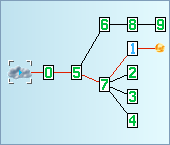
[4]Branches Tree (Low priority)
Visualization of all alternative timelines in the current TAS, this helps TASers to have a clear picture of their work. The visualization should display which savestates belong to which timeline and where is the currently played frame of the movie.
Timing
[5]Frame Advance
The ability to pause and advance the emulator by a single frame is essential for achieving maximum precision. Most people seem to prefer that if you hold the frame advance key down, the game will advance at the current speed.
[6]Slow Motion
Not everything that is difficult to play in real time requires the precision of frame advance. Emulators should be able to emulate at 50, 25, 12, 6, and 3 percent normal speed (and possibly other speeds).
[7]Fast Forward
Lots of games include long periods of time where input from the player is not allowed, for example, level transitions or cinematic segments that advance the plot. Emulators should be able to emulate faster than real time to allow skipping through these portions. This includes having a button dedicated to emulating as fast as possible, and the ability to set the emulation speed to (for example) 150, 200, 300, 400, or 800 percent normal speed.
[8]Frame Search (Low priority)
Like frame advance, but also tests for which frame to switch button presses after holding the previous button(s). Simplifies the process of repeatedly loading a save state to find the minimum number of frames before the game allows a desired outcome. To support this feature, it is practically required that the emulator also supports rewinding[17] first.
Usability
[9]Key remapping
Most people like to remap game buttons and emulator functions to keys other than default, or to a gamepad. These include pausing the emulator, selecting/saving/loading a savestate, frame advance, etc. Ideally, joypads should be supported in addition to the keyboard, for those who wish to use them for emulator features without going through an external mapping program.
[10]Read-only Toggle
In read-only mode, loading a savestate will cause the movie to begin playback from that savestate. Out of read-only mode, loading a state will resume recording from that point. Saving a state will create a savestate without changing the movie file in either mode. Of course, the toggle must work even while the movie is in the process of playing or recording.
[11]Information Display
The emulator should allow players to display useful information while
playing, such as the frame counter or which buttons are being pressed.
[12]Export To AVI
It helps movies to be published more easily if the emulator can export to AVI (using a user-selected encoding scheme) during playback. A frequently-requested feature is for the AVI to be split into multiple files if it approaches 2 gigabytes, because larger AVI files tend to be corrupted.
[13]Memory Search
When making a movie, it is helpful to be able to search through memory to find and display values at specific addresses, or to search for a specific value. This is most useful for boss fights, but also for optimizing movements and randomized resource usage. Preferably it should be possible to watch known relevant values while the game is running without needing to navigate through a dialog every frame to see the numbers.
[14]Autofire (Low priority)
It's very convenient if the emulator allows players to set a button to be pressed every other frame, or every third frame, etc. Preferably the autofire should take effect on the frame it is activated individually of other buttons, so that it is possible to set two buttons to alternate, and it should be possible to autofire any button on any player's controller.
[15]Auto-hold (Low priority)
For games that need a button held down for a long period of time (such as the "run" button) or for making 2-player runs easier to make, the ability to simply toggle any button on or off (so that it doesn't need to be manually held down) is surprisingly helpful.
[16]Combos or macros (Low priority)
The ability to replay a frequently-used key sequence into the movie currently being recorded. Very few emulators support this although several people have requested it.
[17]Rewind (Low priority)
An emulator should transparently save a state every 5 seconds or so, and keep track of the last 20 or so states so that a movie can be rewound, in effect. This is especially convenient for people watching the movies who want to reexamine a bit of the action without replaying the whole movie from the start. The number of states and frequency of saves should be configurable. A nice extra feature is for the emulator to use these (or other) rewind states to allow for (possibly unlimited) single-frame rewinding.
adelikat: Any emulator with Lua capability can easily be scripted to do this. As such these emulators don't need (and probably won't have) a hardcoded version of this. For those emulators I put them listed as partially implemented.
Emulation features
[20]Proper emulation of power cycling
TODO: expecting emulation experts.
It does not need to be accurate (as that would be likely to introduce nondeterminacy without using a savestate). Its result should be, if inconsistent, reproducible.
[21]Disabling layers (Low priority)
Some games have 'dark' areas that are unplayable until your character retrieves a certain item, such as a torch or night-vision goggles. If specific sprite layers can be disabled, these areas may become playable without the required item. It can also be used to reveal hidden parts of the level to find hidden items or better understand the level layout.
- AnS: This feature is really of lowest priority. Analyzing the game by watching the screen output is rather superficial approach. Use Lua for displaying hidden data. Use VG maps/atlases for understanding the level layout.
- feos: Except this feature is critical to create those maps.
[22]Accurate emulation of soft resets (Low priority)
Most emulators don't do this. It would be nice.
- Bisqwit: What does this actually mean? How can we find out if an emulator emulates soft resets accurately? What are soft resets, anyway?
- upthorn: A soft reset is what happens when the player hits the reset button on the console (as opposed to a hard reset, which is achieved by turning power off and back on). These would more accurately be called warm resets and cold resets, because they are both hardware features. Certain games exhibit different behavior between a warm reset and a cold reset, and at least one Sega Genesis game (X-Men) requires a warm reset in order to complete it.
Additional Emulator features
[23]Scripting Support (e.g. Lua, Python, Tcl)
A powerful tool that allows the user far more control over how the emulator behaves.
[24]Lag Counter
Whenever the a game fails to poll for input, this counter would increment. This is useful for minimizing lag, and optimizing menus/screen transitions.
[25]Option for frame advance to skip lag frames (Low priority)
An extension of the lag counter feature. This would be a toggle that allows frame advance to advance to the next frame in which input is polled.
[26]Built-in Input Editor
A Piano Roll-based editor allowing quick movie splicing and nonlinear editing of the movie Input. Bonus points for implementing extensive data visualization (Lag log, Hot Changes, Markers, etc).
Tables of currently supported features
Keep in mind that none of the current emulators or movie formats does everything listed on this page. That being said, here are the descriptions of those currently in use:
| Emulator | bp [1] | rs [2] | ud [3] | bt [4] | fa [5] | sm [6] | ff [7] | fs [8] | kr [9] | ro [10] | id [11] | ea [12] | ms [13] | af [14] | ah [15] | cm [16] | rw [17] | pc [20] | dl [21] | re [22] | lua [23] | lc [24] | sl [25] | ie [26] |
|---|---|---|---|---|---|---|---|---|---|---|---|---|---|---|---|---|---|---|---|---|---|---|---|---|
| BizHawk | + | + | - | - | + | + | + | ± | + | + | + | + | + | + | + | + | + | + | + | + | + | + | + | + |
| FCEUX (win) | + | + | + | + | + | + | + | ± | + | + | + | + | + | + | + | + | + | + | + | + | + | + | + | + |
| FCEUX (lin) | + | + | + | - | + | + | + | ± | + | ? | + | + | - | + | - | - | + | ? | + | + | + | + | + | - |
| FCE Ultra (win) | + | + | - | - | + | + | + | - | + | + | + | + | + | + | + | + | + | ? | - | + | + | - | - | - |
| FCE Ultra (lin) | + | + | - | - | + | + | + | - | ± | + | + | ± | ? | - | ± | - | - | ? | + | + | + | - | - | - |
| Famtasia | - | + | - | - | - | + | + | - | + | ± | ± | ± | - | + | - | - | - | ? | - | - | - | - | - | - |
| VirtuaNES | ? | + | - | - | + | + | + | - | + | - | ± | ? | + | ± | - | - | - | ? | - | + | - | - | - | - |
| Nintendulator | ? | ? | ? | - | ? | ? | ? | - | ? | ? | ? | ? | ? | ? | ? | ? | ? | ? | ? | ? | - | ? | ? | - |
| Snes9X (win) | + | + | - | - | + | + | + | ± | ± | + | + | + | + | + | + | + | - | ? | + | + | + | + | - | - |
| Snes9X (lin) | + | + | - | - | + | + | + | - | + | + | ± | ± | - | - | - | - | - | ? | + | - | + | ? | - | - |
| ZSNES | + | + | - | - | + | + | + | - | + | + | ± | + | + | + | - | + | + | ± | + | + | - | - | - | - |
| lsnes | + | + | ± | - | + | + | + | - | + | + | + | + | + | + | + | + | ± | N | - | + | + | + | + | ± |
| Dega (win) | + | + | - | - | + | + | + | - | + | + | + | - | ? | + | + | ? | ? | ? | - | ? | + | - | - | - |
| Dega (lin) | + | ? | - | - | + | + | + | - | - | ? | ? | + | ? | - | - | ? | ? | ? | ? | ? | ? | - | - | - |
| Gens (win) | + | + | - | - | + | + | + | + | + | + | + | + | + | + | + | - | - | ? | + | - | + | + | + | - |
| Gens (lin) | - | + | - | - | + | + | + | - | - | + | ? | + | - | - | - | - | - | ? | - | - | + | ? | ? | - |
| Grrl | + | + | - | - | + | + | + | - | + | + | + | - | + | - | - | - | - | ? | + | - | - | - | - | - |
| Gens Plus | - | - | - | - | + | - | ± | - | ± | - | - | - | + | - | - | + | - | ? | - | - | - | - | - | - |
| VBA (win) | + | + | - | - | + | + | + | + | ± | + | + | + | + | + | + | - | + | ? | + | N | + | + | + | - |
| VBA (lin) | + | + | - | - | + | + | + | - | ? | + | + | + | ? | ? | ? | - | - | ? | ? | N | - | - | - | - |
| Mupen 64 (win) | + | + | - | - | + | + | + | - | ± | + | + | + | - | ± | ± | - | - | ? | N | - | - | - | - | - |
| Mupen 64 (lin) | + | + | - | - | + | + | + | - | ? | + | + | + | - | ? | ? | - | - | ? | N | - | - | - | - | - |
| PCSX | + | + | - | - | + | + | + | - | + | + | + | - | + | - | - | - | - | ? | N | ? | - | + | - | - |
| PSXjin | + | + | - | - | + | + | + | - | + | + | + | - | + | - | - | - | - | ? | N | ? | - | + | - | - |
| Mednafen | + | + | - | - | + | ? | + | - | + | + | + | - | - | + | - | - | - | ? | - | ? | - | + | - | - |
| PCEjin | ? | ? | ? | - | ? | ? | ? | ? | ? | ? | ? | ? | ? | ? | ? | ? | ? | ? | ? | ? | ? | ? | ? | - |
| VBjin | ? | ? | ? | - | ? | ? | ? | ? | ? | ? | ? | ? | ? | ? | ? | ? | ? | ? | ? | ? | ? | ? | ? | - |
| DeSmuMe | + | + | - | - | + | + | + | - | + | + | + | + | + | + | + | - | - | ? | + | ? | + | + | - | - |
| Yabause | + | + | - | - | + | - | + | - | + | + | + | + | + | - | - | - | - | ? | + | ? | - | + | + | - |
| JPC-RR | + | + | + | - | + | - | - | - | - | ± | + | ± | - | - | + | - | - | ? | N | N | + | N | N | - |
| openMSX | + | + | - | - | + | + | + | - | ± | + | + | + | + | - | - | - | + | + | ± | ± | + | + | - | - |
| Final Burn Alpha | ? | + | ? | - | ? | ? | ? | - | ? | ? | ? | + | ? | ? | ? | ? | ? | - | ? | ? | - | ? | ? | - |
| Hourglass | + | ± | - | - | + | + | + | - | + | + | ± | + | ± | - | - | - | - | - | - | N | - | - | + | - |
| DOSBox | ? | ? | ? | - | ? | ? | ? | ? | ? | ? | ? | ? | ? | ? | ? | ? | ? | ? | - | ? | - | - | - | - |
| Dolphin | + | + | + | - | + | + | + | - | + | + | + | + | + | + | + | - | - | - | N | ± | - | + | ? | - |
Movie file features
See also: required movie file features by this site.
Movie features
[30]Storing and loading emulator settings and ROM data
If the emulator lets the player set options that might affect playback, such as sound frequency or PAL/NTSC, these settings should be saved in the movie file and automatically loaded during playback.
It is also useful if the movie files stores data such as:
- ROM Name
- ROM Checksum
- Emulator version
- Number of rerecords
- A user-configurable comment (such as the author's name)
And the emulator should alert the user of any possible errors on playback from these values mismatching, such as playing back the movie using a ROM that has a different checksum than the movie was recorded with.
Note that the ROM checksum should be written in a way that allows reliably distinguishing a wrong ROM from a correct one. A CRC32 or MD5sum of the entire ROM's contents (including possible trainers) would be preferable. It should not be just a copy of some bytes from the ROM, because that does not enable reliable detection.
[31]Starting recording from power-on
Possibility to start recording from power-on with no savestates or RAM or SRAM stored within the movie file, is necessary to provide a fair, common ground for competitive purposes.
It is also a requirement on this site.
[32]Recording peripherals (Low priority)
The movie format should support recording of non-standard input that might be important for certain games (gun accessory, motion sensor, light sensor, etc.).
[33]Recording resets
Supports recording of soft resets, or hard resets or power cycles that don't clear SRAM.
[34]Movie chapters (low priority)
[35]Embedded Subtitles (low priority)
TODO: descriptions
Input formats
TODO: descriptions
[40]Input data in binary
[41]Input data in text
[42]Frame-by-frame input data
Easier to slice and concatenate input.
[43]Timestamp-based input data
Easier to modify a segment without affecting the others.
Note: FCM uses offsets from previous input events.
[44]Context-independant input data
Note: FCM records toggles instead of the current state of the input. Do PXM and PJM record cheat/hack toggles?
TODO: descriptions
Movie Formats:
| Format | sl [30] | po [31] | rp [32] | rr [33] | mc [34] | es [35] | ib [40] | it [41] | fi [42] | ti [43] | ci [44] |
|---|---|---|---|---|---|---|---|---|---|---|---|
| BK2 | + | + | + | + | - | + | - | + | + | - | ? |
| BKM | + | + | - | + | - | + | - | + | + | - | ? |
| FM2 | + | + | ± | + | - | + | + | + | + | - | ? |
| FM3 | + | + | ± | + | + | + | + | + | + | - | ? |
| FCM | + | + | ± | + | - | - | + | - | - | - | - |
| FMV | ± | + | ± | - | - | - | + | - | + | - | ? |
| NMV | ? | + | ? | ? | ? | ? | ? | ? | ? | ? | ? |
| VMV | ± | + | + | + | - | - | ? | ? | ? | ? | ? |
| MMV | ± | + | - | ? | - | - | + | - | + | - | + |
| GMV | ± | + | - | - | - | - | + | - | + | - | + |
| SMV | + | + | - | ± | - | - | + | - | + | - | ? |
| ZMV | + | + | + | + | + | + | + | - | ± | - | ± |
| VBM | + | + | ± | + | - | - | + | - | + | - | + |
| M64 | + | + | ± | ± | - | - | + | - | + | - | ? |
| PXM | + | + | ± | + | - | - | + | - | + | - | ± |
| PJM | + | + | ± | + | - | ? | + | + | + | - | ? |
| MCM | ? | ? | ? | ? | ? | ? | + | - | ? | ? | ? |
| MC2 | ? | ? | ? | ? | ? | ? | - | + | + | - | ? |
| DSM | - | + | - | + | - | ? | - | + | + | - | + |
| YMV | - | + | - | - | ? | ? | - | + | + | - | + |
| FR | - | - | N | ± | - | - | ? | ? | ? | ? | ? |
| FBM | ? | + | N | ? | - | - | + | - | + | - | ? |
| DOF | ± | ? | ? | ? | ? | ? | ? | ? | ? | ? | ? |
| JRSR | + | + | + | + | - | - | - | + | - | + | ? |
| OMR | + | + | + | + | - | - | - | + | - | + | + |
| LSMV | + | + | + | + | - | + | + | + | + | - | + |
| DTM | ± | + | + | ± | - | - | + | - | + | - | + |
Legend:
| Emulator or Format | This emulator or movie format has already been supported and used for publication. |
|---|---|
| Emulator or Format | This emulator or movie format has not yet been supported and used for publication. |
| + | Has this feature |
| - | Does not have this feature |
| ± | This feature is partially implemented (or partially available) |
| ? | Not known (Hopefully this will be gone after some more people have at the table) |
| N | This feature is not applicable to this emulator |
See also:
FractalFusion: Don't most emulators do some of these already? In other words, is mentioning slow motion and such necessary, and why?
xebra: This page was made as a reference for people wishing to add rerecording support to an emulator.
I figured I'd just make as complete a list as I could. As far as I know there is nothing on the list that is already present in all emulators.
Phil: It is missing the autobot feature like Luke's bot in FCEU. Someone could explain it? Also, something not mentioned is a "Picture comparator", I mean that sometimes you do pixel precised moves and you must compare between 2 scenarios. Usually, I save them as PNG an compare and see what is best. It would be better if it is built-in. Also, one thing that isn't mentioned is the Gui interface. Seriously why should I use those command lines version when it's much simpler to use a GUI.
upthorn: Gens has an option "Reset 68000" which resets the CPU. However, it is unknown if this accurately emulates a soft reset.
ideamagnate: What exactly is Gens/Linux? If it's just Gens with Bisqwit's patch it only has basic support for GMV playback. If it's Gens/Win32 running under a compatibility layer like wine, that should also be specified.
- In my opinion, the grrl, should be the Gens for Linux.
- upthorn: Gens Linux is whatever DeHackEd uses to encode gmv files. I don't think it's just Bisqwit's patch, and it's definitely not Gens Win under WINE. And there's not complete agreement that grrl is the best Gens for Linux, so I'm leaving it as separate entries for the meantime.
ideamagnate: I've also deleted some comments pertaining to the table, now that it exists and the format has stabilized.
Nach: I removed having two entries for ZSNES. ZSNES unlike other emulators has the main code base completely equal between ports.
okaygo: I changed the features around for Mupen64, however I am not sure if they work on Linux.
klmz: Someone should do more tests on them.