Joined: 6/5/2025
Posts: 7
Location: middle of nowhere
I use a *fairly* low-end laptop, with a Ryzen 3 3250U + integrated Radeon graphics. Using OBS to record footage, I noticed that the CPU usage is not only high, but that the game would stutter frequently. I double-checked by playing a low-graphics game and that game seemed to run smoothly with minimal CPU usage, so I was wondering if there's anything I could do to make BizHawk run smoother.
I have already tried disabling the rewind feature, I have already installed BizHawk prerequisites, and I have also disabled OBS' preview function.
It's not from the same developer. AV Soccer is developed by Hacker International, whereas this game is from Hummer Team.
YoshiRulz wrote:
CNR. Are you using the NesHawk core? Re-enable the status bar and click the dump status button—does it match this?
Inferred from iNES header; potentially wrong

------
BEGIN NES rom analysis:
Found iNES header:
pr=128,ch=512,wr=8,vr=0,ba=0,pa=0|1,brd=MAPPER116,sys=NES-NTSC
Found iNES V2 header:
pr=128,ch=512,wr=0,vr=0,ba=0,pa=0|1,brd=MAPPER0116-00,sys=NES-NTSC
Since this is iNES we can (somewhat) confidently parse PRG/CHR banks to hash.
headerless rom hash: SHA1:297A10BDDD9A00A3B808B0EBD280A1E1A54E9A57
headerless rom hash:  MD5:D07B996329B9FFFB52535100C82E0916
Could not locate game in bizhawk gamedb
Could not locate game in nescartdb
Attempting inference from iNES header
Failed to load as iNES V2
Chose board from iNES heuristics:
pr=128,ch=512,wr=8,vr=0,ba=0,pa=0|1,brd=MAPPER116,sys=NES-NTSC
Final game detection results:
pr=128,ch=512,wr=8,vr=0,ba=0,pa=0|1,brd=MAPPER116,sys=NES-NTSC
""
Implemented by: class Mapper116
END NES rom analysis
------
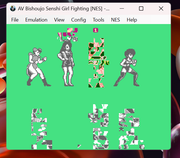
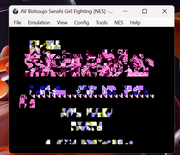
I switched cores from quickerNES to NesHawk and it ended up solving the issue, as the game does not have these garbled sprites after switching into NesHawk. The dump status check is also mostly the same, although the iNES header, iNES heuristics, and final game detection results are missing "NES-NTSC".
Joined: 6/5/2025
Posts: 7
Location: middle of nowhere
I tried playing the titular bootleg NES fighting game in Bizhawk, but it seems that most of the sprites in the game have a garbled appearance. I tried opening the ROM using lsnes, and it seems to be working fine, but I want to use Bizhawk specifically because recording movies there is easier. Anyone can help?
Joined: 6/5/2025
Posts: 7
Location: middle of nowhere
feos wrote:
How do you normally load it in regular MAME?
It refuses to boot for the same reason (incorrect checksum). I guess that it isn't possible to play this ROM hack in BizHawk then. Strange, because the download page for the ROM hack also came with a version of MAME-rr that ignored these checksum warnings...
Joined: 6/5/2025
Posts: 7
Location: middle of nowhere
I'm trying to play a ROM hack of an existing MAME game, but every time I try to play it in Bizhawk, it throws out an error stating that all of the files have the wrong checksum. Is there any way to bypass this, like in MAME-rr?
Joined: 6/5/2025
Posts: 7
Location: middle of nowhere
YoshiRulz wrote:
> Arcade
It would be in sync settings. If it's definitely missing from there but shows up in standalone MAME, post the rom checksum info and feos will investigate later.
It's not in there - the sync settings only has the ability to stretch the screen instead of the built-in widescreeen settings I was talking about.
That being said, I found out that I could turn on the game's native widescreen by simply going into the game's settings (which I overlooked), instead of accessing dipswitch settings. The sync settings widescreen option still helped to shape the screen though (as the default option of 4:3 always forces it to be in 4:3).
Regardless, thank you for your help
Joined: 6/5/2025
Posts: 7
Location: middle of nowhere
No, I'm not talking about the current settings that allow you to just stretch everything in 16:9. Street Fighter III: 2nd Impact has a widescreen option hidden in the game's machine dipswitches, and it differs from BizHawk's 16:9 display option.
Any way to enable the setting?