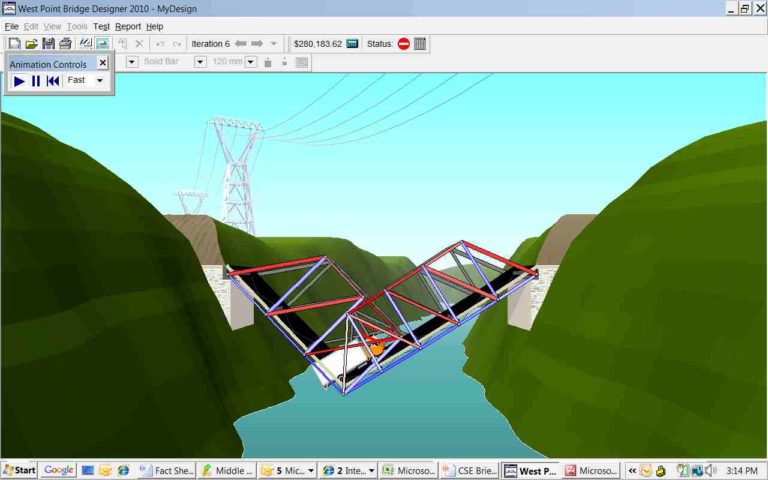
West Point Bridge Designer 3.01 is an engineering sim for Windows 3.1. This TAS aims to finish a successful bridge in the fastest time.
This PD software was downloadable as binary and source from SourceForge for years. 2½ months after my
previous run, all installers and disk images were delisted to push people toward the new web version of Bridge Designer, sponsored by ASCE. To his credit, co-developer Gene Ressler preserved
the source and all previous commits, I'm guessing because schools were only interested in the old binaries. But I wasn't finished TASing these old versions, and believe public domain things belong to the public, so I preserved them on
Archive.org and
GitHub. Along with TAS-ready ISOs from
iso_maker, naturally!
This improves my
previous TAS by 1.556 seconds. 0.528 second was saved from gameplay, and the rest from installing the game in a verification movie this time. Also, I found that 640x480 screen resolution is fastest for this design due to some beams requiring the mouse be dragged further than it can travel in a frame, 256px, on higher resolutions. Each beam this is done for would take at least 2 frames longer to draw. Since changing resolution requires a reboot, I decided it was better relegated to a setup movie than included in the actual TAS.
I liked that my previous run succeeded using only the default material and thickness. Like beating a final boss with a level 1 hero, defying the intended route and winning anyway is part of the speedrunning spirit! But elegant solutions can be left to other categories, and the speed of the build here is pretty cool. As a bonus, only three bars ended up being changed from the default carbon steel 120 x 120.
About the run
- Aims for fastest completed bridge (any%)
- Has a verification movie
- Has extended input for encodes
- Contains speed/entertainment tradeoffs (3 frames to name bridge's designer "TAS" to look good in screenshots)
- Sync note: You may need to play back in TAStudio or unbind mouse controls for the ending to play correctly (per fsvgm777)
Back in the day, I took part in the WPBD 2005 contest as part of my school's curriculum. My bridge was inefficient and costly, but I enjoyed trying different designs,
the funny ways they could fail, and the colorful red and blue beams when the bridge needed improvement. I emailed myself the installer and have since moved it to every new PC I got.
Once again, I use the mouse for most things due to the lack of useful keyboard shortcuts. Using 8.75 for mouse sensitivity in the sync settings (or 12 for 800x600 and 16.5 for 1024x768), I can move in half-spaces around the game's grid using only BizHawk's Mouse Speed X/Y controls. This is much less worry about exactly which pixel I'm landing on, so I can focus on draw timing.
As seen in the image above, mouse inputs are buffered and generally execute in a 2-3-2-3 frames pattern at DOSBox-x's 70 FPS, possibly due to lag. Despite this, inputs don't seem to be dropped, unlike with 60 FPS, which is 0.061 second slower for this TAS overall.
- The actual verification movie is straightforward, other than having to work around a bug: Any shortcut, whether from a Program Group or the DOS prompt ('win wpbd3.exe') will fail with an error relating to the game's cmdialog.vbx file after a restart. It doesn't matter which Program Group or Item, installation folder, or autoexec commands you try. The trick I mentioned last submission – launching the shortcut without closing the Setup window – doesn't work here since Setup is closed during a restart, thus breaking the shortcut.
- The solution is to launch WinFile.exe (Explorer.exe's precursor) from DOS, and nest the game .exe as an argument for that program.
- You can also edit the Program Item to do this (which changes the WPBD icon to WinFile's), but this is 0.038 second slower than launching W3.1, WinFile, and the game all directly from DOS.
- Perhaps due to an existing commdlg.dll existing in C:\Windows\System, WPBD can't be installed to the Windows folder, where it may have been fastest to launch. Instead it will give the puzzling error that the program needs a newer version of Windows.
- I confirmed this in testing by deleting the game's commdlg.dll, which allows the game to launch as it should from C:\Windows. However, I don't do this in the TAS since it would be modifying the game files.
- Installing to the C: root would also take extra frames, now that two other files I need to launch (WIN.COM and WinFile.exe) are located in the Windows folder. So, I installed to the subfolder C:\Windows\o. The one letter is quick to type, and 'O' is guaranteed not to be a held key from earlier in the input.
- As mentioned before, screen resolution is set to 640x480 to minimize lag, at the cost of some graphical fidelity.
The TAS
- Manually typing the DOS prompt took the exact same ms as the autoexec movie I linked in the last section. To simplify the verification movie, I chose to type it myself. I used Tab, wildcards, and finally the Home and End keys to jump around and build different words in fewer frames.
- Some intro dialogs are double-cleared with a single Space input, taking advantage of the game being unable to process the next screen quickly enough since Windows itself has barely booted. The window for this trick disappears if you increase CPU cycles too high since processing is no longer an issue.
- This bridge design only draws 1 joint. The other 7 are put there by the game, and can't be moved.
- After that, drawing is switched to beams. Unfortunately, there aren't keyboard shortcuts to do this, the Load Test, or most other useful things, so I click the button instead.
- The strange webbed design of this bridge and the rule to connect every joint with triangles means I can't draw in a continuous line. I pick up and move the cursor several times, which is optimally done every 2nd placement (and 4th, 6th, etc.), so I draw beams mostly in pairs.
- Clicking one of the dropdown menus on the top can change this to the 3rd, 5th, etc. placement instead, depending on when you select it.
- I could have changed the beam size anytime, but did it near the end because I think it looks better. I set it to max (250 x 250) using the End key, which only takes a frame. The PgDown and 2 keys could also increase the beam size, but wouldn't be thick enough to work for this bridge.
- The only two beams that need to be max size are the outermost two on top, but due to the pairing method I mentioned, it's a frame faster to click the dropdown after the 8th draw than the 9th.
- Once again, the Load Test is triggered on the last frame after drawing is done. That's it!
WPBD series and future
3.01 is the oldest surviving pre-yearly build. Since it has a version number, it may have been made for, and used in Lt. Col. Ressler's classes at West Point. WPBD 4.0.6's installer is the first to mention a national contest starting on 2001/11/11. This same start date is given in WPBD 2002's installer, along with an end date and specific prizes, suggesting that 4.0.6 was simply retitled WPBD 2002. If Stephen gives 1998 as the year of WPBD 1.0's release, and 4.x was made in 2001, then filling in the gaps, 2.x may have come out in 1999 and 3.01 in 2000. I'm guessing 1.x and 2.x ran in Visual Basic 6 on Win3.1 as well.
WPBD3's strengths are its quick startup on a 16-bit OS and much faster member selection than its pre-Java successors (can select 176 beams in 18 frames/0.257 second!). Its weaknesses include slow Load Test loading, even on a modern PC; very few helpful keyboard shortcuts such as Tabbing to toolbar buttons; no "graceful handling" for beams drawn across multiple members; and an out of memory error after drawing ~178 members, even on a modern PC. Though the latter can be a strength in that it limits a "max cost" bridge to a number I feel I can reasonably reach manually in a TAS.
WPBD4 is improved in nearly every way:
- Joints have more forgiving collision when clicking and dragging, and no longer give an error when you miss your destination or draw too many members.
- Load Test starts without delay, with smoother animation and physics changes.
- Drawing a member across 3 or more beams now splits it into several automatically, like you'd expect.
- Save files have a .bd4 extension and a slightly changed, though still text-based format.
- Also a skippable tutorial, bridge anchorages, 5-move undo/redo history, startup tips, iteration history allowing you to return to a previous design with one click, a hi-res grid option which doubles the amount of grid spaces, and an auto-updating and sortable member list.
- As far as weaknesses, selecting beams is an order of magnitude slower and the program doesn't seem to launch in the faster-booting W3.1, even using Win32s.
Most future versions would have more minor changes:
- 2002 fills the remaining joint collision gaps, and introduces piers for bridges and the final file extension, .bdc (for Bridge Design Contest).
- 2003 adds settable bridge height for extra cost, and a new Load Test location in the mountains.
- 2004 adds a keyboard shortcut for the Load Test, load test options, even smoother animations, and new grid numbering with no more half-steps by default. However, hi-res grid's new quarter-steps allow way more addressable spaces than before (~49x57 -> ~113x129). It also changes the .bdc save format entirely to hexadecimal.
- 2005 adds tension physics, which highlight failed members in blue instead of red, and drops Windows 95 support.
- 2006 features a change to the default beam size (120 -> 160 mm), which might speed up a fastest-time TAS.
- 2007 adds local contest codes, pier and anchorage combinations, and concrete and truck options.
- 2010 adds more contest code things, but otherwise seems the same as 2007. The dropping of Win9x support may have simply been done to discontinue the separate legacy OS installer.
- 2010 (2nd ed.) is rewritten in Java 6 to make it cross-platform, specifically 1.6.0_15, which I haven't been able to find for free. 2013's help file says this launched with unlimited undo, beam select via the member list, a Member Details tab, and 3D "game-quality" free look during Load Test if launched on a modern PC and not using the "for older computers" shortcut. Beam drawing now snaps to adjacent joints, so you barely need to drag beams at all if all your joints are close by.
- 2013 includes the Java 1.6.0_43 runtime in the installer. It (and possibly 2010–12) are now optimized for screen resolutions of 1024x600 or greater, with 1280x1024 being the intended ideal. Default beam size is changed again to 140, there are more keyboard shortcuts such as Ctrl+Z for undo, and an option to turn off 3D free look by default, good for PCs with weak integrated graphics like mine. Single-lane permit loading now weighs 480 kN and cost calculations are entirely different.
- 2014's .bdc format is the exact same as 2013's other than byte 0x03. Change it to 94 and you can load 2013's files.
- 2015 drops the West Point branding, possibly due to the end of financial support from the academy. It also has compression strength and cost differences for the same bridge design as I used in 2013–14, tested both with a new bridge and by editing the old save's byte to 95.
- 2016 is the final release of Bridge Designer on desktop platforms. Changes from 2015 are contest codes and some cost calculations. Change 0x03 to 96 to use old bridges.
Of these, I think 2006–07 seem the most interesting of the classic ones to TAS, and after that, any of 2013–16 depending on specific cost/compression for the category (min score, max score, playaround, etc,) and bridge I'd want to build. WPBD 2014, the final West Point one, could be preferable for consistency with the previous versions' titles. But seeing as 2016 edition bridges that aim for minimum cost were
still being shared a few years later, TASing the last ever desktop release could be more impressive to that community.
I plan to submit the minimum cost movie soon, and show off the strategy of building a bridge that's cheap even for the U.S. dollar's value in the year 2000. Maximum cost will similarly require a lot of thinking (and possibly botting) that could pay off in an entertaining way.
Thanks to
- eien86 for DOSBox-x and commenting on my previous submission
- MUGG and Dimon12321 for commenting on my previous submission
- The BizHawk team for continuously improving the DOS core and EmuHawk
- You, for watching